 Roundra
Paste a roster. Get a playable bracket.
Roundra turns a list of names into a real tournament — seeded draw, court schedule, live scores, printable bracket. Eight formats, fully offline, no account.
Free · No account · Works with zero bars of signal
Champion decided offline
Three rounds from list to live bracket
No forms, no sign-up flow, no spreadsheet wrangling. Roundra is built for the ten minutes before the event starts.
Paste your roster
Drop in names from a group chat, sign-up sheet, or notes app — one per line. Add optional affiliations like club or school so the draw can keep teammates apart.
Pick a format and seed the draw
Choose from 8 formats, then seed as entered, shuffle, or drag a manual draw. Presets for random, reverse, alphabetical, and spread-affiliations seeding.
Run the event
Enter scores, fix a wrong winner without rebuilding the bracket, track match status, and put the bracket on a venue screen with presentation mode.
One tournament, end to end
Real screens from the app, in the order you'll actually meet them — build the draw, work the desk, read the standings, put it on the wall, and keep it for next time.
-
Build the draw
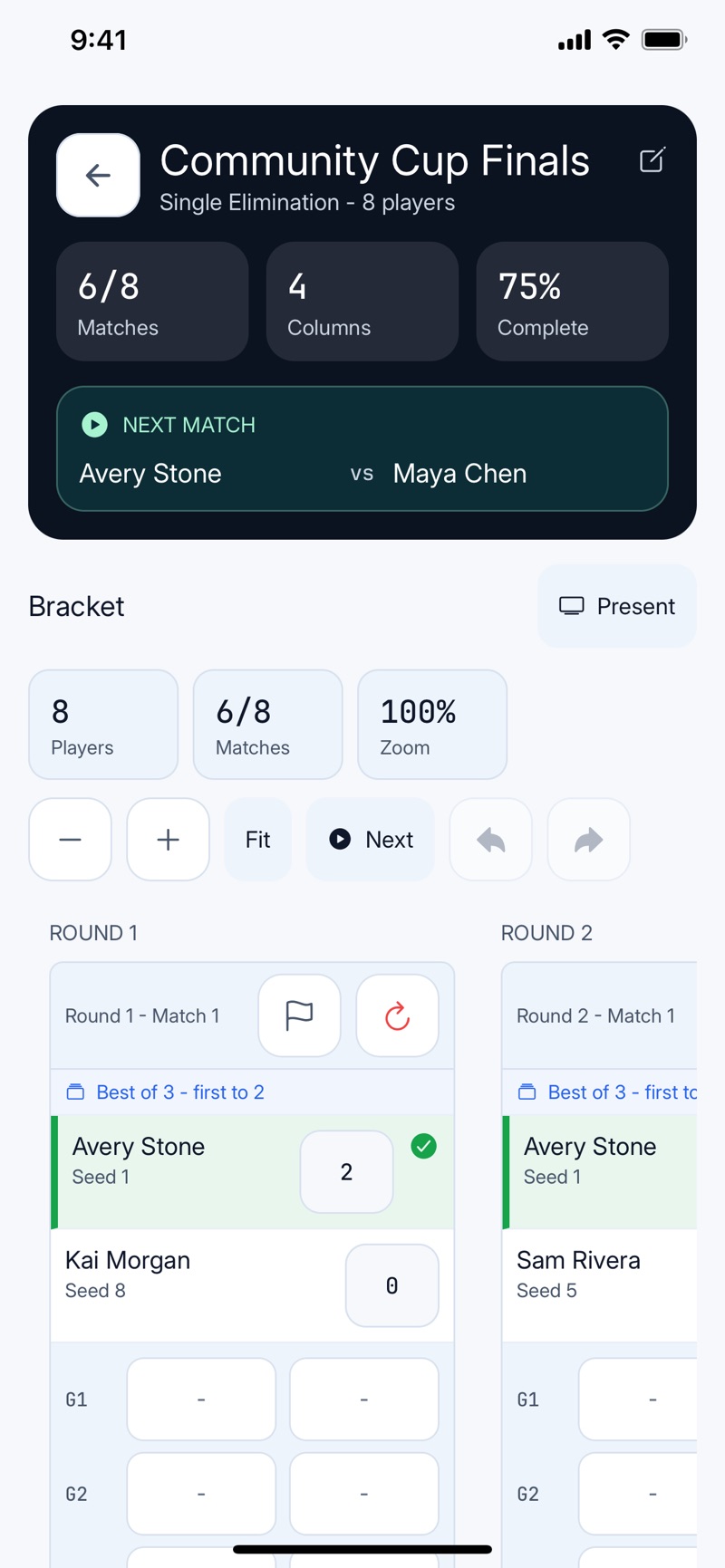
Eight names in, seeded bracket out
Paste the roster, pick single elimination, and the draw is playable immediately. The header keeps the count honest — matches played, columns remaining, percentage complete — and pins the next matchup so the desk always knows who to call.
-
 Work the desk
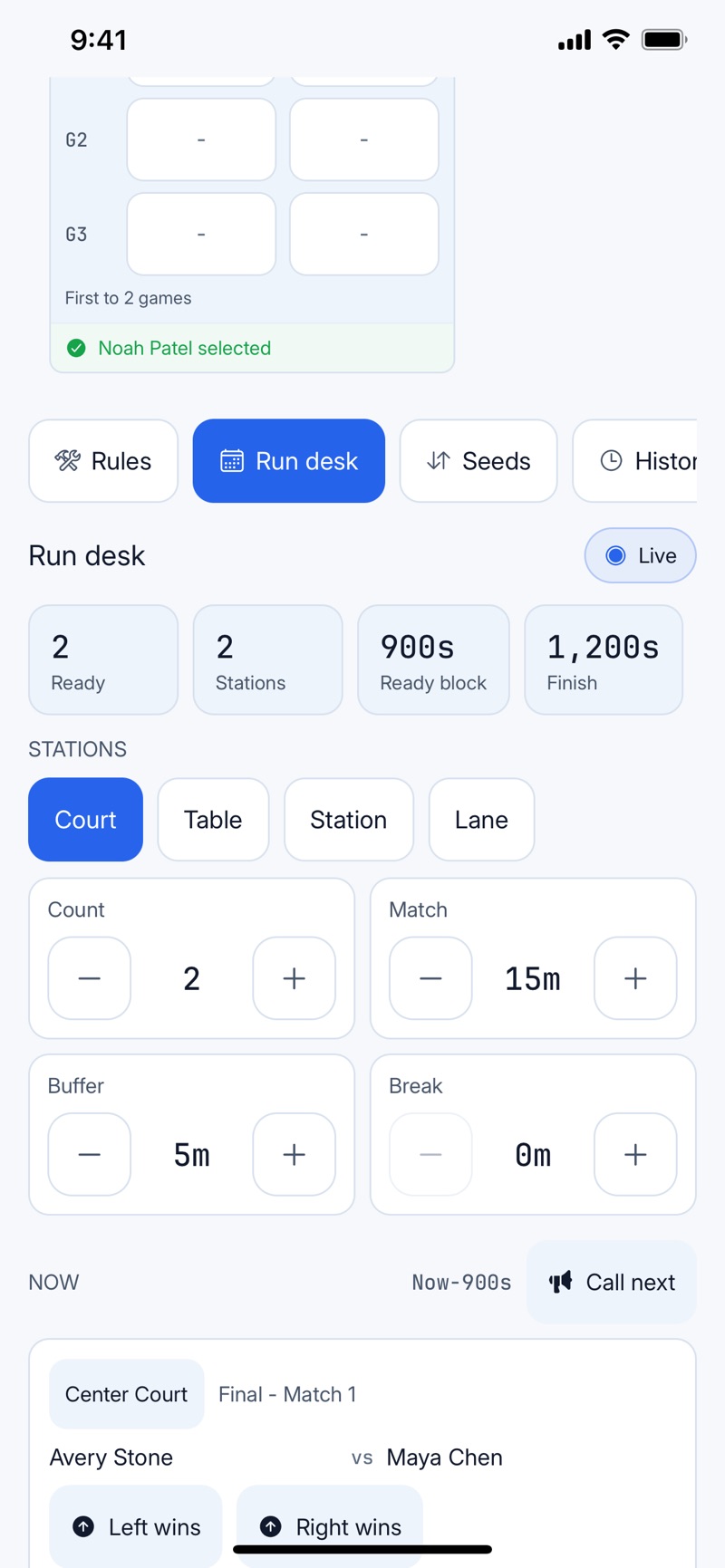
Stations, timings, and a Call next button
Set how many courts you have, how long a match runs, and your buffer and break minutes. Roundra lays the matches into waves, shows the projected finish, and scores the live match with a single tap on Left wins or Right wins.
-
 Read the standings
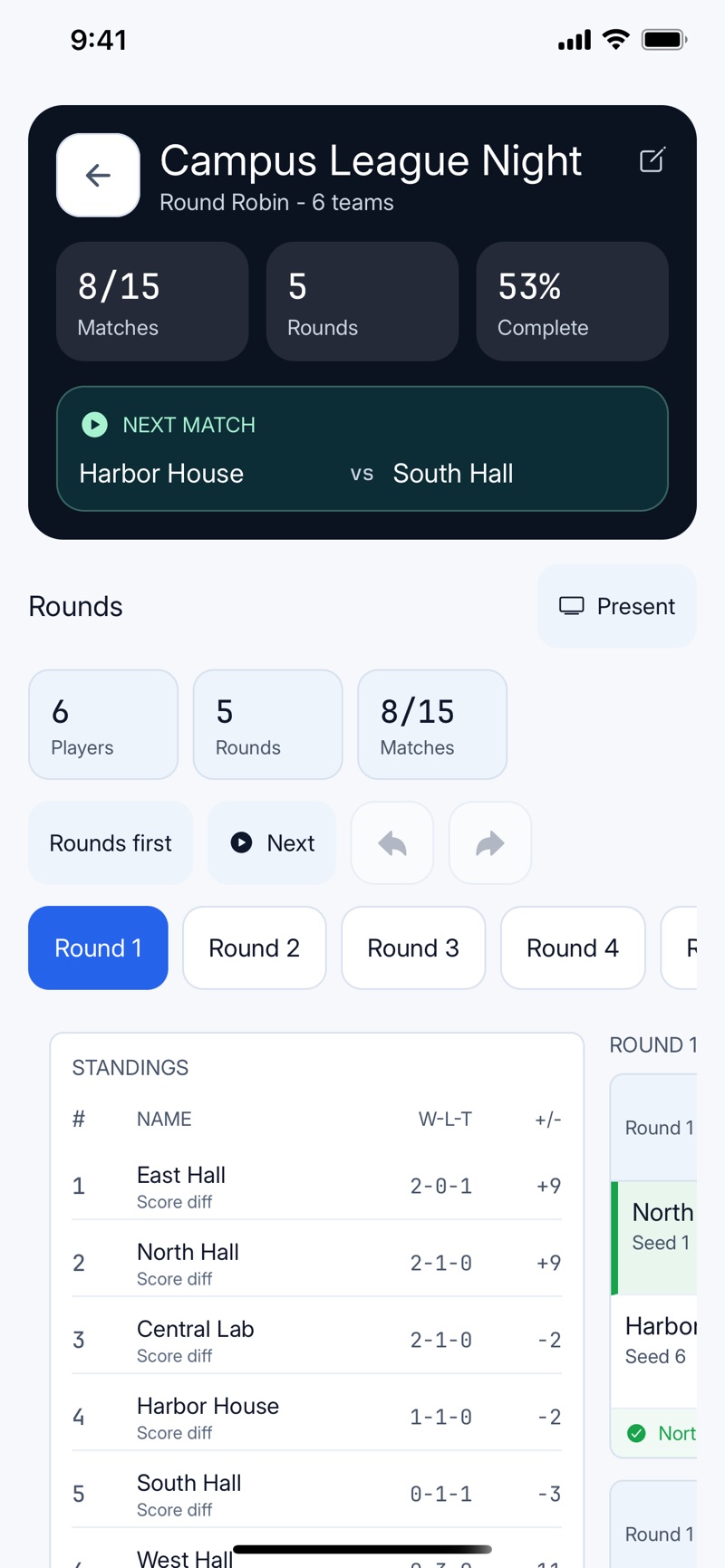
The table updates as the scores land
Round robin, league, and pool formats keep a live standings table beside the fixtures — win-loss-tie records and score difference, ordered by the tiebreakers you chose. Jump between rounds without losing your place in the schedule.
-
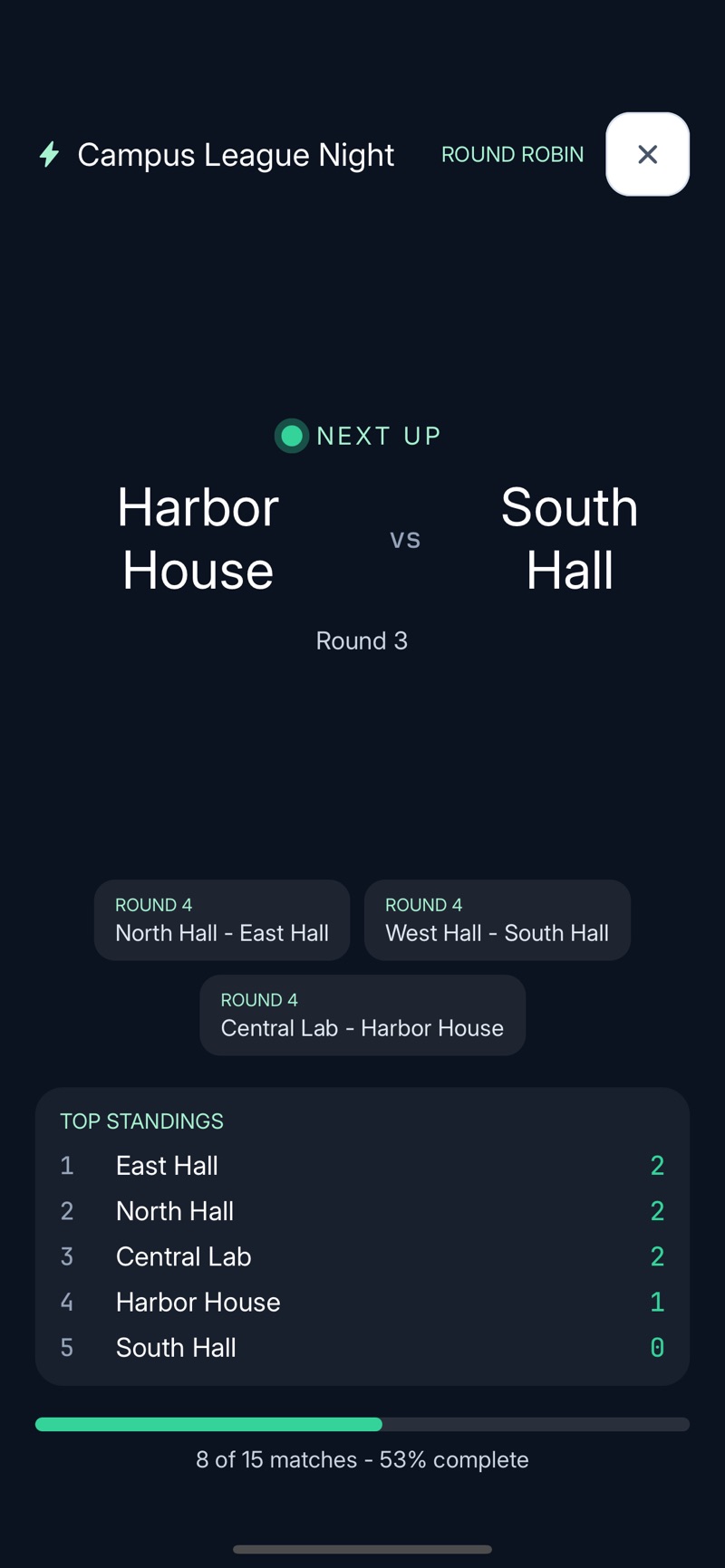 Put it on the wall
Presentation mode for the venue screen
One tap turns any phone or tablet into a scoreboard: the next match in type you can read across a gym, the fixtures behind it, top standings, and a progress bar. The screen stays awake as long as the bracket is up.
-
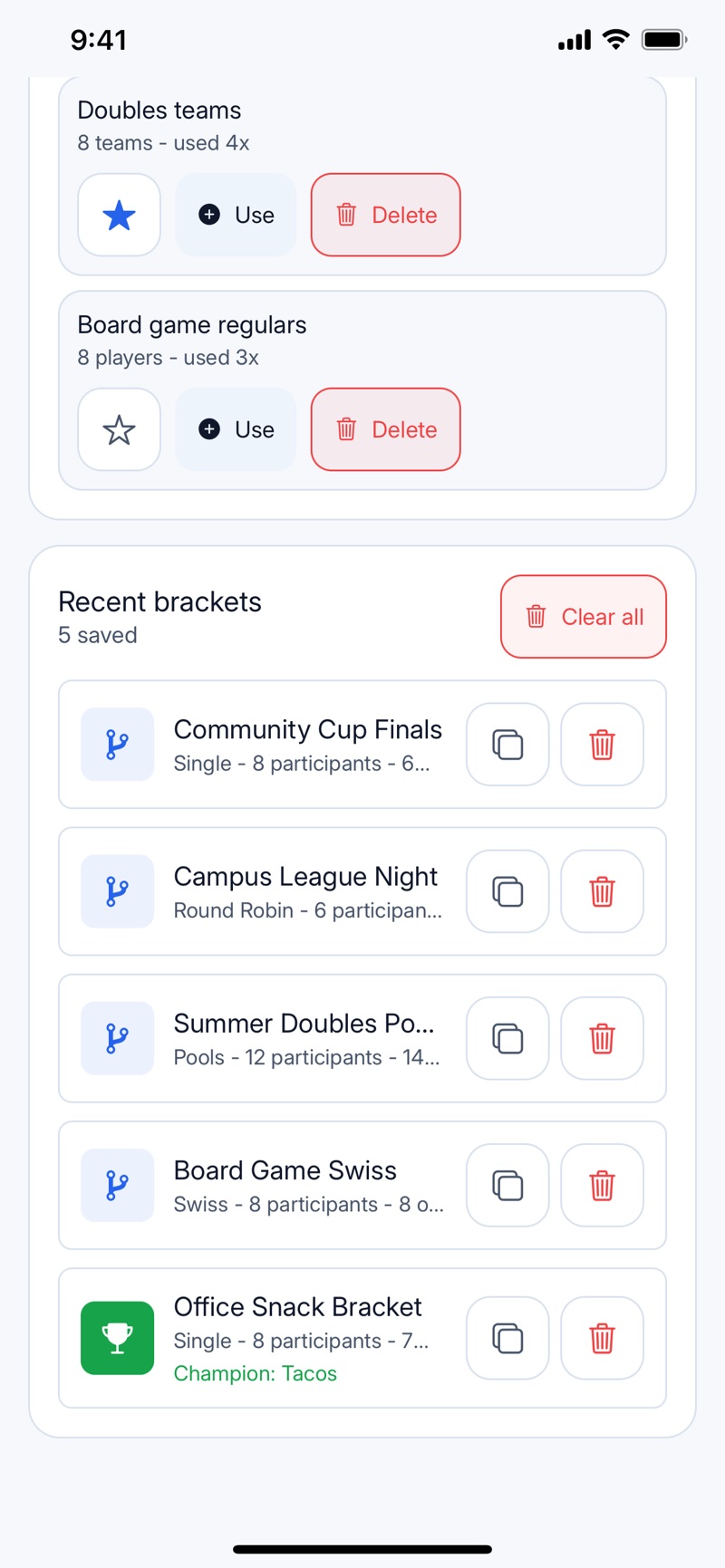 Keep it for next time
Rosters and brackets stay on the device
Save the regulars as a reusable roster preset and every bracket lands in a library you can duplicate — league night, doubles pool, or the office snack bracket whose champion was Tacos. All of it local, no account, nothing uploaded.
Eight tournament formats, one draw sheet
From a Saturday knockout to a season-long ladder — with third-place matches, consolation brackets, best-of series, and configurable tiebreakers where each format needs them.
- Single elimination
- Classic knockout. Lose once and you're out — fastest way to crown a champion, with an optional third-place match.
- Double elimination
- Everyone gets a second life through the losers bracket. Fairer results without doubling the day.
- Round robin
- Everybody plays everybody. Standings with tiebreakers you control: score difference, points for, points against, or seed.
- League + playoff
- A round-robin regular season that feeds the top 2, 4, 8, or 16 into a knockout playoff.
- Pools + playoff
- Group stage with 2, 4, or 8 pools; the top finishers from each pool advance to the bracket.
- Swiss
- Paired by record each round — no eliminations, no blowout mismatches. You choose the round count.
- King of the hill
- Winner stays on. Perfect for pickup nights and arcade-style challenges.
- Ladder
- Climb by challenging the rung above across as many rounds as your season needs.
The tournament desk, in your pocket
Most bracket apps stop at the draw. Roundra also handles the part that actually gets stressful: match day.
Courts, waves, and a real timeline
Tell Roundra how many courts, tables, or stations you have, how long a match runs, and your buffer and break times — it lays the matches out in waves so you can see when the event ends before it starts.
- Stations with custom labels — courts, mats, boards, rigs, whatever your venue calls them.
- Match statuses — ready, checked in, live, delayed — so the desk always knows what's holding things up.
- Forfeits and no-shows recorded properly instead of faked as scores.
- Winner repair — entered the wrong result two rounds ago? Fix it and the bracket recalculates.
Walls, group chats, and spreadsheets covered
A bracket only works if people can see it. Export in the shape each audience needs.
PDF, PNG, CSV, and a run sheet
- PDF bracket in three styles — clean for the clipboard, dark for screens, scoreboard for the wall.
- Run sheet PDF — the station-by-station schedule for your event desk.
- PNG image for the group chat or a social post.
- CSV export of results and standings for your league spreadsheet.
- Text summary to paste anywhere.
- Presentation mode keeps the venue screen awake while the bracket is up.
Settle anything with a bracket
Participants don't have to be teams. Roundra has built-in participant types for players, songs, movies, foods, and custom items — so the same engine that runs your volleyball night can settle movie night.
- Best pizza topping · 16 seeds
- Office playlist final · song bracket
- Film club showdown · movie bracket
- Family game night · king of the hill
Your tournament lives on your phone
Roundra is local-first: brackets, rosters, and scores are stored on your device. No account to create, no third-party advertising, no advertising identifier. Gym basements and campgrounds with zero bars are fully supported venues. And with 37 languages — including right-to-left support for Arabic and Hebrew — the whole club can read the draw.
Learn to run a better tournament
Practical, evergreen guides for organizers — no fluff, real math, printable logic.
- Single vs double eliminationWhich knockout format fits your event, with match-count math.
- Round robin schedules & tiebreakersThe circle method, match counts, and fair standings.
- Tournament seeding, explainedWhy 1 plays 16, how byes work, and when to just shuffle.
- Plan a tournament day on limited courtsWaves, match length math, and finishing on time.
Questions before the whistle
Where can I download Roundra, and is it on iOS or Android?
Both. Roundra is out now and free on both stores. The App Store version runs on iPhone and iPad with iOS 16.4 or later; the Google Play version covers Android phones and tablets. There is no account to create, and once installed the app runs fully offline.
Which tournament formats does Roundra support?
Eight formats: single elimination, double elimination, round robin, league + playoff, pools + playoff (group stage), Swiss, king of the hill, and ladder. Options include third-place and consolation matches, best-of series (1, 3, 5, or 7), configurable tiebreakers, pool counts, and playoff advancement counts.
Does Roundra work offline?
Yes. Roundra is local-first: brackets, rosters, scores, and settings are stored on your device, and no account is required. You only need a connection for things you choose, like sharing an exported file.
Can I export or share a bracket?
Yes. You can export a bracket as a PDF in clean, dark, or scoreboard styles, save it as a PNG image, export results to CSV, generate a printable run sheet for the event desk, and share a text summary.
Is Roundra only for sports tournaments?
No. Participants can be teams, players, songs, movies, foods, generic items, or a custom label you choose — so it works for rec leagues and club nights as well as fun decision brackets like ranking snacks or films.
What languages does Roundra support?
Roundra is fully localized into 37 languages, including English, Spanish, French, German, Portuguese, Japanese, Korean, Chinese (Simplified and Traditional), Arabic, Hebrew, Hindi, and more, with right-to-left layout support for Arabic and Hebrew.
Does Roundra show ads or track me?
Roundra does not run third-party advertising and does not use an advertising identifier. Your tournament data stays on your device unless you choose to export or share it.